


 Back
Back 







Saving & investing
Your bank data is yours. Here’s how to put it to work.
1 July 2026
Reading time: 5 minutes
By Tom Hartmann,
1 comment
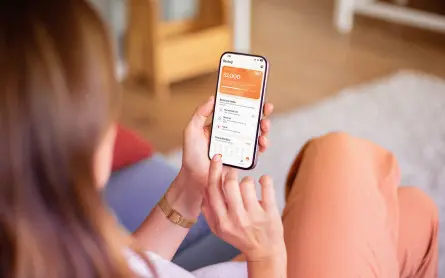
These days it’s easier than ever to connect apps safely to your bank data and make your money move the way you want it to.
If you haven’t heard yet, Sorted’s got an app coming out. Our first one! (It’s about time, I hear you say.) It’s all about emergency savings, and it’s called Buffer builder.
Now, you may be totally across your data rights and something called ‘open banking’ (which is more like ‘closed’ actually, since it’s a private way of connecting your apps securely to your bank accounts without anyone else butting in). But if not, it’s important to know you have rights! Your customer data rights came in with the Customer and Product Data Act 2025 that was passed last year.
Your bank has been keeping your data since day one, including details about your pay, everything you spend on, where you shop, etc. That data is yours now. The ‘open’ in ‘open banking’ simply refers to unlocking it and sending it where you need.
Hang on, is it really safe to connect my bank account to an app?
I don’t know about you, but I’m a bit uneasy about connecting my bank accounts to anything. It’s hard enough keeping your cash safe from scammers out there.
But most of open banking is read-only, so none of your transactions can be seen, no money can be moved, and nothing can be changed without you turning it on. And turning it off takes only a couple of clicks.
As I hooked up my bank accounts to Buffer builder as we were working on it, it was all pretty smooth and felt as safe as logging into my bank app. I had to know how to drive a phone for sure, but easy enough. It wasn’t long before I recognised my data flowing through to the app.
Here’s how open banking works in New Zealand
As you might imagine, there’s a fair bit of plumbing required to flow everyone’s financial information into their apps. How exactly does it happen?
This isn’t some Wild West startup thing. After the Customer and Product Data Act 2025 became the law of the land, the first cab off the rank was the banking sector. (Electricity’s next.) At this point all the big banks have signed on and invested heaps to make this work: ANZ, ASB, BNZ, Kiwibank, Westpac. So, this is a government-mandated initiative regulated by MBIE.
And I need to introduce you to Akahu, which is the New Zealand company in the middle that wrangles all that data and manages the digital plumbing that keeps it all up-to-date and accurate. The other month, I got an email asking if Akahu were on the up and up, and I can say they’ve been great to work with. They’re accredited so they can request data on your behalf from your bank. They’re certified, use the latest encryption, backed by Westpac, and are independently audited. They’re bona fide.
Why do you need to know about Akahu? You may be already using them actually. They’ve got tens of thousands of us connected and more than 130 products already rely on them to work (think Pocketsmith, Feijoa, etc).
How to securely link your bank feeds to your app
So basically, here’s the flow when you’re setting up your bank feeds so your app will work for you:
- Your app (such as our new Buffer builder) prompts you to link your bank accounts. You choose the bank you’re with.
- Akahu then confirms your identity and what data you are requesting, such as your personal information, account data, payment authorisation.
- You are directed to your bank app and log in privately (no one sees your password).
- You pick the accounts you’d like to connect and authorise it to happen. The bank confirms the connection. You log out and return via Akahu to your app.
- All hooked up! You see the accounts you’ve chosen and all your transactions in the app and it can start to do good things for you.
You’ll need to rinse and repeat if you have accounts with other banks or if you want to move money, such as for payments or squirreling money into another account.
Your spending tells a story. Your saving will make it an even better one.
I will say this: harnessing your data feeds opens up a world of possibilities. With your financial data on tap, you can now:
- Track and plan your financial life that much easier.
- Steadily stash money into your own separate accounts.
- Round up into savings and investment accounts.
- Pay for stuff.
- Fill out applications (like for a mortgage) so much simpler. (Remember having to come up with three months’ bank statements applying for a loan? Now you can have same-day turnaround instead of days of paperwork.)
- Easily share your situation with a financial adviser.
Exciting times. And open banking helps it all happen. When you start with your transaction data, you can move towards shaping your story your way, especially through saving and investing.
Still have questions? Some answers for you, rapid fire.
Can they move my money?
Only with your explicit approval through your bank’s own payment flow.
What if something goes wrong?
Akahu has dispute resolution processes; Privacy Act 2020 applies.
What data is shared?
Balances and transaction history, mostly. It doesn’t get stored.
What if I change my mind?
Simply disconnect in two taps. You can do this in your app or in your bank app, or in your Akahu account.
You’re always in control.
About the author

Comments (0)
Comments
No one has commented on this page yet.
RSS feed for comments on this page | RSS feed for all comments